
UK Yellow Page
Your Essential Digital Toolkit in the United Kingdom
Your Essential Digital Toolkit in the United Kingdom
Costxx 查貨助手使用教學:即時掌握熱賣貨品庫存及價格
If these tools have made your UK life easier,
feel free to buy me a coffee!
如果這些工具對您在英生活有幫助,
歡迎請我飲杯咖啡!

Add this tool to your home screen for instant access to real-time stock info anytime!
將此工具加到手機主畫面,隨時隨地即可快速開啟查看即時庫存!
The app automatically locates your nearest Costxx. You can browse by category, search for specific items, and contribute by reporting stock levels.
系統會自動定位離您最近的 Costxx。您可以按分類瀏覽、搜尋特定貨品,並透過即時匯報貨量與其他網友互助。

💡 Pro Tip / 小貼士:
Undo a Report: If you accidentally tap the wrong stock level, you can quickly tap "Undo" on the pop-up notification to cancel it.
取消匯報: 如果不小心按錯貨量,可以在彈出的提示框中即時點擊「取消 (Undo)」以撤回匯報。

Click "Trend" (📈) to see detailed data from the last 5 days. Use the Heatmap to find the best time to shop!
點擊「走勢」圖標即可查看近 5 天的詳細數據。透過庫存點陣圖 (Heatmap),助您找出最佳購物時機!

Manage all your tracked items in one place. Check availability across different branches simultaneously.
在關注清單中統一管理所有追蹤貨品,您可以同時查看同一貨品在不同分店的存貨狀況。

Can't find what you are looking for? Suggest a new item to our community database.
如果找不到您想要的熱賣產品,您可以提交建議,讓管理員將其加入清單中。

Want to track prices? / 想追蹤價格?
Instantly see the current price, VAT status, and sale deadlines on the product page.
在產品頁面上即時查閱最新價格、是否含稅,以及特價結束日期。
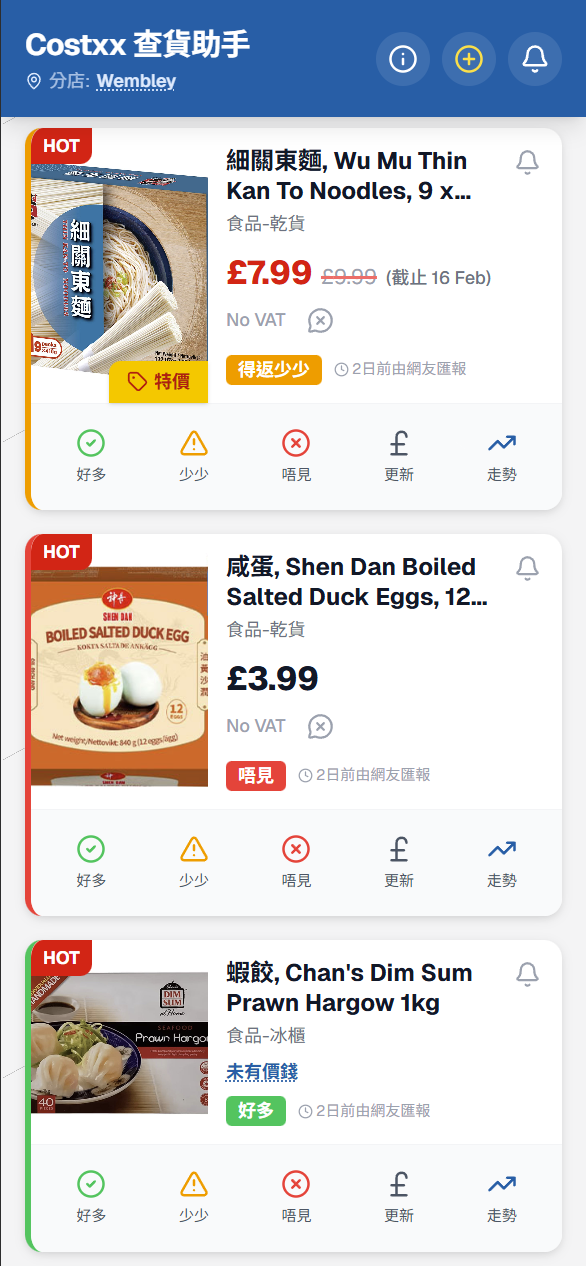
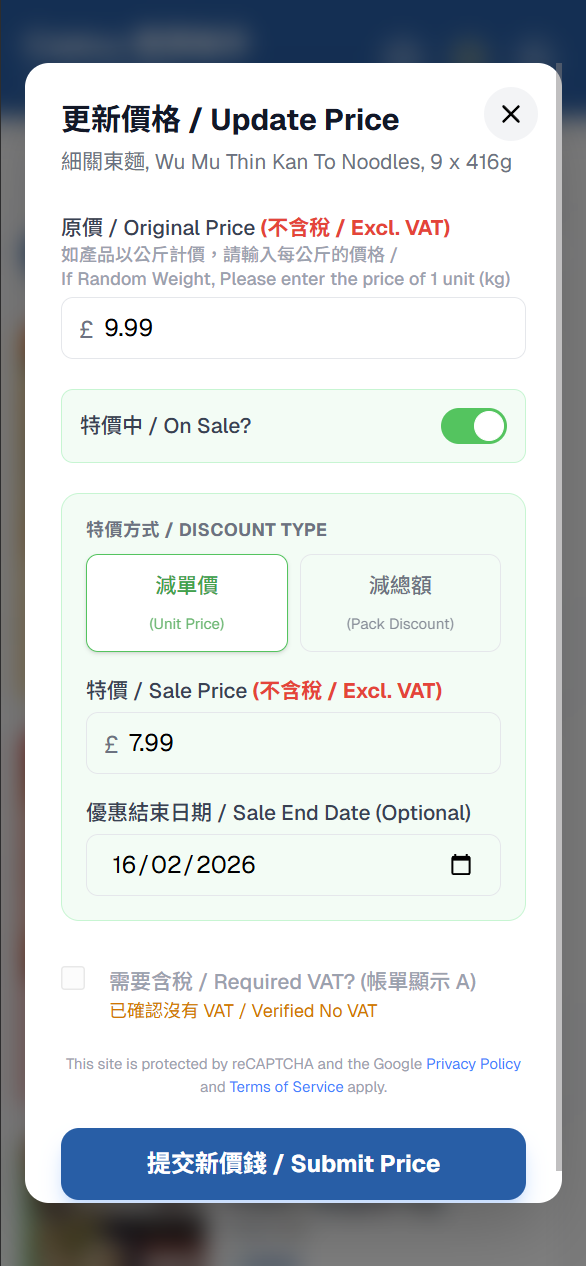
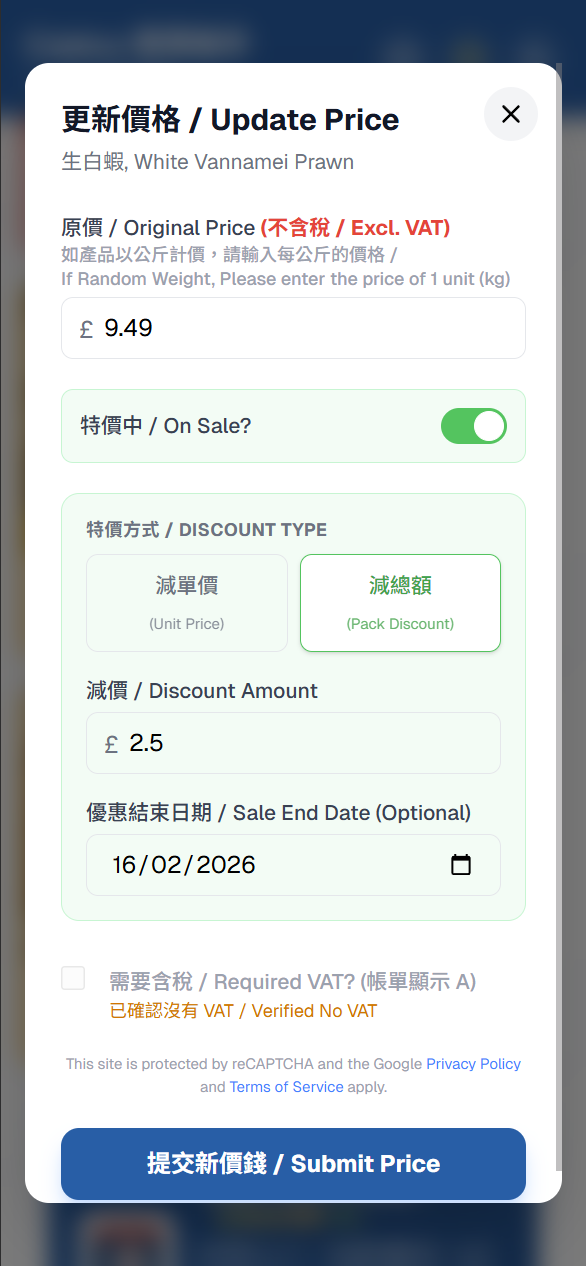
Help the community by updating prices. You can input standard prices, unit discounts, or pack discounts.
更新價格,互助互利。系統支援輸入標準價格、減單價或減總額(如肉類海鮮)等模式。
Standard/New Item
標準/新貨品
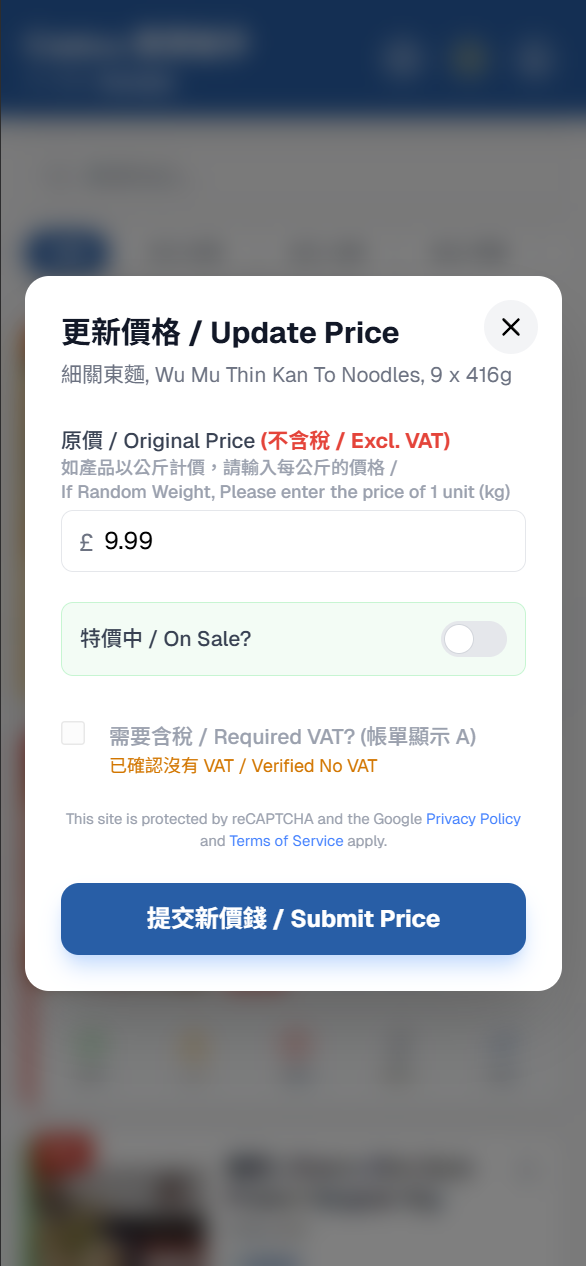
On Sale (Unit Price)
特價中 (減單價)
Pack Discount
減總額 (e.g. 肉類或海鮮)
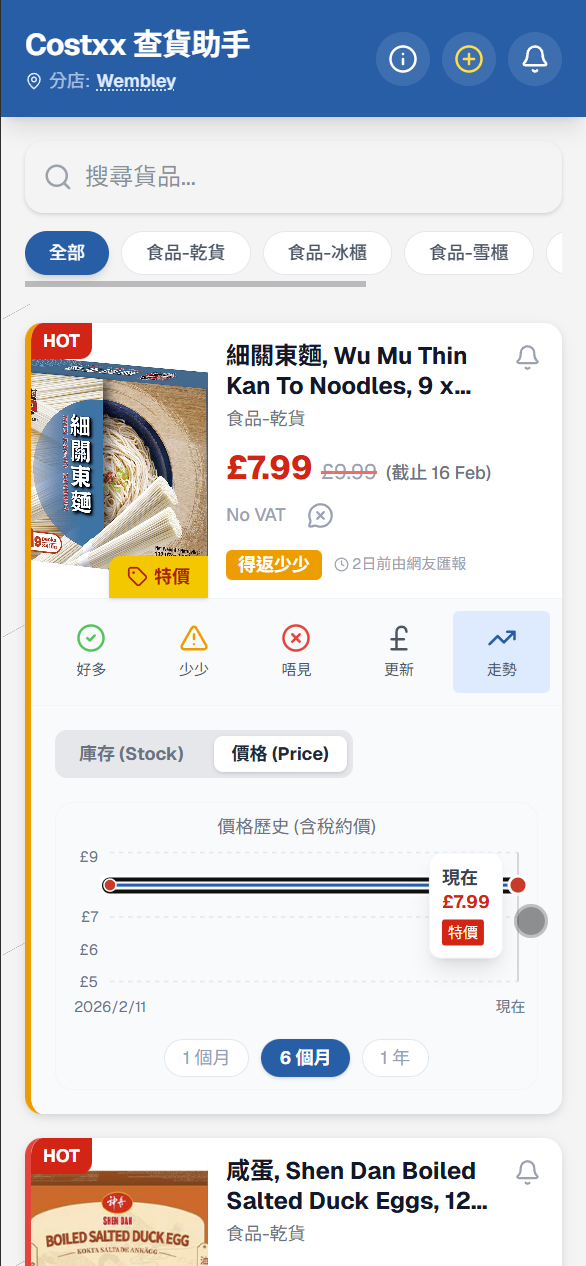
Switch between 1 Month, 6 Months, or 1 Year views to track price changes over time.
點擊「走勢」進入詳細圖表,切換 1個月、6個月或 1年 檢視過往價格歷史,掌握最佳入手時機。
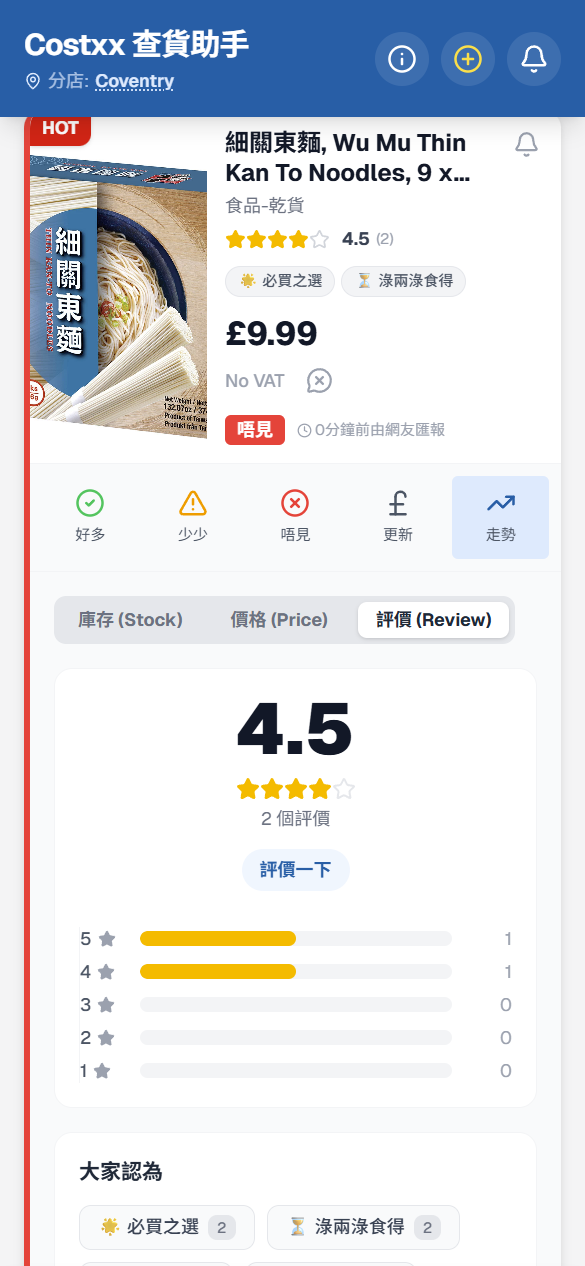
Want to know reviews? / 想看產品評價?
You can instantly view the latest product reviews on the product page:
在產品頁面上,您可以即時看到該產品的最新評價資訊:
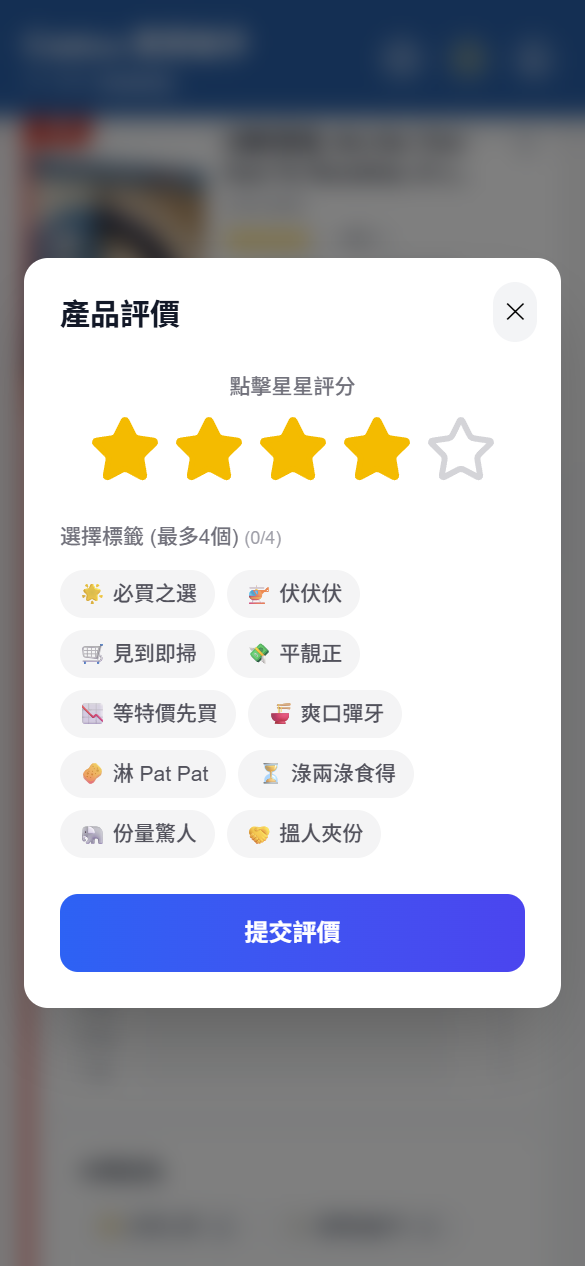
Share your experience to help others! Here is how to rate a product:
您的分享能幫助更多網友!您可以透過以下方式進行評分:
Missed the basics? / 想看基本教學?
Your Data Stays on Your Device.
您的資料僅儲存於閣下的裝置中。
Your Watchlist and settings are stored locally on your device's browser cache. We do not store your personal shopping habits on our servers. Your privacy is highly protected.
您的關注清單與偏好設定僅儲存於您手機瀏覽器的暫存中。我們不會在伺服器上記錄您的個人購物習慣,隱私度高,請安心使用。
Q: Is this app free to use? / 請問這個工具是免費的嗎?
A: Yes, the Costxx Stock Tracker is a 100% free web tool for the UK community.
是的,這是一個專為英國社群設計的 100% 免費網頁工具。
Q: Can I use this inside the warehouse? / 可以在貨倉內使用嗎?
A: Unfortunately, mobile signal is often weak inside Costxx warehouses. Since this app requires internet to sync data, it might not work offline.
由於 Costxx 貨倉內訊號通常較弱,且本工具需要網絡同步數據,因此相信在倉內可能無法使用。
Q: Why am I not receiving notifications? / 為何接收不到通知?
A: To keep this tool free and maximize privacy, we do not use "Web Push" technology. Your Watchlist data is stored only on your phone, not our servers.
Running background push notifications would require tracking your device and increases battery consumption. Please open the app to check the latest status.
我們目前未採用 Web Push 推送技術,原因包括:維持工具完全免費、確保個人隱私(關注清單僅存於您手機)。若啟用後台推送,除了需要上傳您的數據,亦可能導致手機耗電量增加。請開啟 App 以即時查看最新狀態。
Q: How can I help? / 我可以如何幫忙?
A: We encourage users to report stock and prices after they leave the store. Your report helps others save time!
我們鼓勵用戶在離開分店後進行「網友報料」,即時分享各分店貨量及價格,助人利己!
Q: Why do I need this tool? / 為什麼我需要這個工具?
A:
If these tools have made your UK life easier,
feel free to buy me a coffee!
如果這些工具對您在英生活有幫助,
歡迎請我飲杯咖啡!

Read daily UK news, learn English vocabulary, and
integrate into local life.
每日英聞 BNO: 睇新聞 · 學英文 ‧ 融入英國生活。提供最新要聞、中文導讀及生字發聲!
Avoid checkout errors! Track your spending in real-time while you shop.
購物計算機: 邊買邊記帳,實時計算總額,避免價格誤差!

Instantly compare product prices across major UK supermarkets using AI.
格價神器: AI 智能辨識相片,即時搜尋全英各大超市最低價及會員價,輕鬆抗通脹!
© 2026 UK Yellow Page. All rights reserved.
Disclaimer: The tools on this website are independently developed for personal assistance. We are not officially affiliated, authorized, or associated with any companies mentioned.
免責聲明: 本網站的工具為獨立開發之個人輔助工具。我們與任何公司無任何官方關聯、授權或合作關係。